Pulse on a conversation
Updated November 23, 2026
When you use Pulse during a call, Sayso saves the market data with the conversation. Open the Pulse tab to see it again.
Open it
- Open Conversations and click the call.
- Click the Pulse tab.
The row for the call also shows Market Pulse with the ZIP code when Pulse was used, or No Market Pulse when it wasn't.
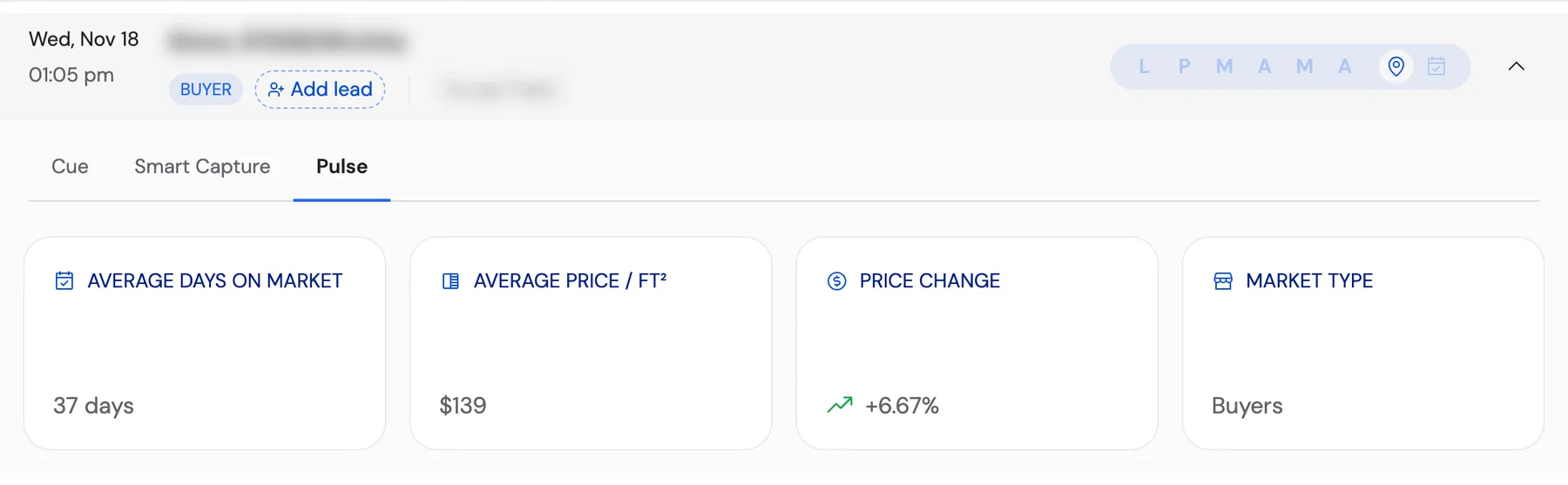
What you see
| Number | What it means |
|---|---|
| Average days on market | How long homes in that ZIP code typically sit before going under contract |
| Average price / ft² | Typical price per square foot in that ZIP code |
| Price change | Recent price trend, as a percentage with an up or down arrow |
| Market type | Whether the area leans toward buyers, sellers or is balanced |
A dash means that number wasn't available for the area. If the tab says No market data available for this conversation., Pulse wasn't used on that call.
Use it in your follow-up
The numbers are also included in the note Sayso sends to your CRM when you link the call to a lead. See Send a conversation to your CRM.
Related
Was this article helpful?
Still stuck? Email support@asksayso.com or join office hours (every Wednesday at 11am PT / 2pm ET).