Using Sayso for FSBO calls
Updated November 23, 2026
What FSBO calls look like with Sayso
For Sale By Owner sellers believe they can handle the sale themselves. They're trying to save the commission. Instead of telling them they're wrong, ask questions that show them what they haven't thought of.
On these calls, Sayso prompts you to:
- Open by complimenting their initiative instead of pitching
- Ask discovery questions about their marketing, showings and how they qualify buyers
- Surface gaps in their plan through questions, not lectures
- Handle "I don't want to pay commission" and "I already have a buyer"
- Offer value, like a CMA, as a natural next step
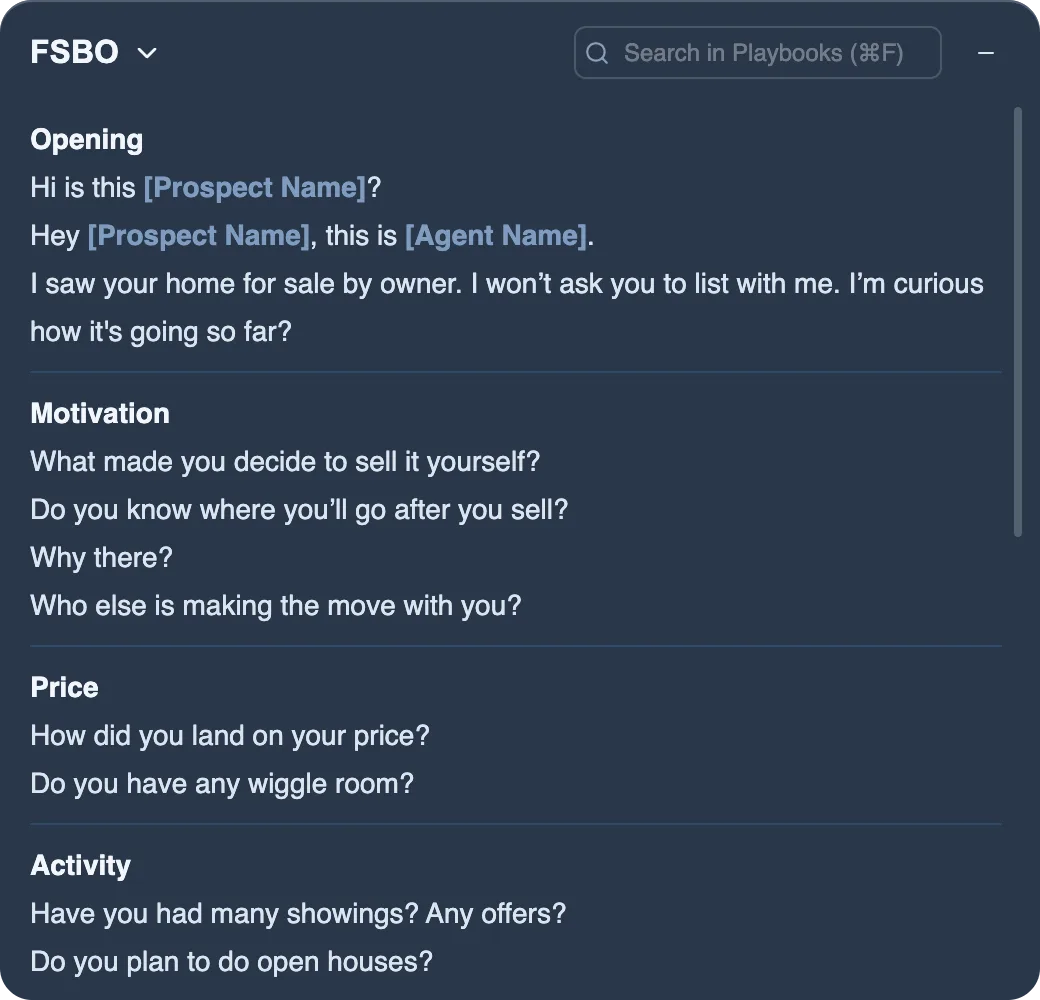
Setup
- Lead type: click Start for Seller.
- Reset and Buffer Time: press Reset when they answer, with Buffer Time at 0.
- Playbooks: keep your FSBO script open. A good FSBO opener acknowledges the seller's effort before asking questions.
Features to have open
- Cue: surfaces questions about their marketing plan, showing process and legal exposure.
- Pulse: pull market data for their ZIP code. FSBOs often overprice, so have the numbers ready.
- Smart Capture: captures their situation, timeline and price expectations.
Common objections Cue helps with
- "I'm not paying a commission"
- "I already have a buyer"
- "I've gotten plenty of showings"
- "I'm just testing the market"
- "I used to be an agent" or "I know someone who is"
Tips
- Never say they need an agent. Ask questions that let them arrive at that conclusion.
- Use Pulse to build trust. When you can cite days on market and price trends for their exact area, they see you as a resource.
- Plan the second call. FSBOs rarely list on the first call. Use your Smart Capture notes to make the follow-up call personal.
Was this article helpful?
Still stuck? Email support@asksayso.com or join office hours (every Wednesday at 11am PT / 2pm ET).