Answer market questions with Pulse
Updated November 23, 2026
Look up a ZIP code during a call
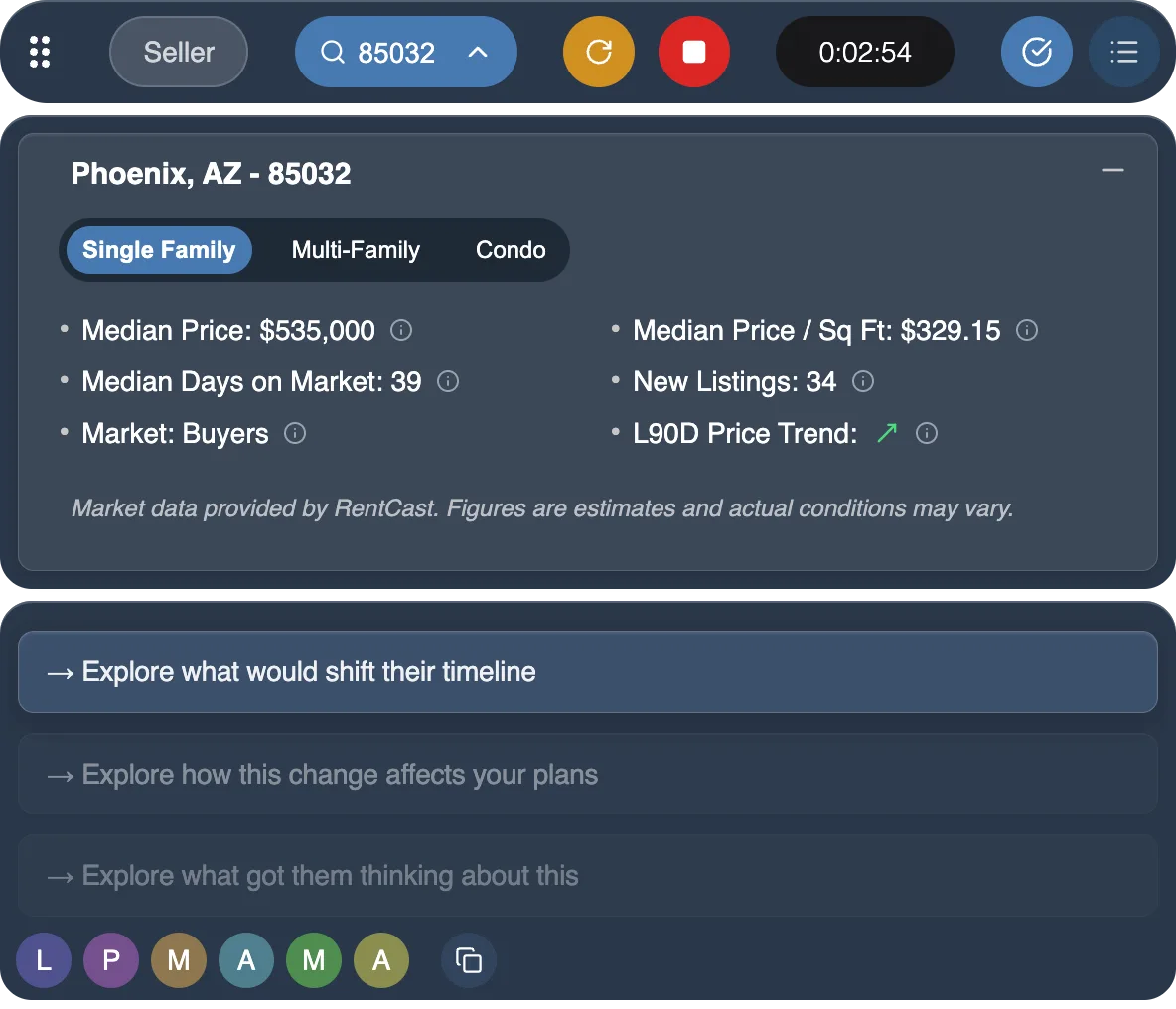
- While a session is going, find the ZIP code box with the search icon in the Coach widget toolbar.
- Type the five-digit ZIP code the person mentioned.
- Open the details to see the city, a tab for each property type, and that area's market stats.
- Hover the small info icon next to a stat to see what it means.
- Click the minus icon to close the details when you're done.
If you don't see the ZIP code box, Pulse may be hidden in your settings. See Pulse.
Pulse covers US ZIP codes. If there's no data for a ZIP code, Pulse says so. Try a nearby one.
When to use it
- They ask about the market. "What are homes going for around here?" Give them a number for their area.
- A seller's price expectations seem off. Share what the area's numbers say and let them react.
- Early on an internet lead call. If they say "I'm looking in 85251," look it up and mention what you see.
- On FSBO and expired calls. Specific numbers for their ZIP code show you know the area.
After the call
The market data you looked up is saved with the conversation, under the Pulse tab in Conversations. See Pulse on a conversation.
Was this article helpful?
Still stuck? Email support@asksayso.com or join office hours (every Wednesday at 11am PT / 2pm ET).