Coach widget or Sayso won't open
Updated November 23, 2026
First step, always
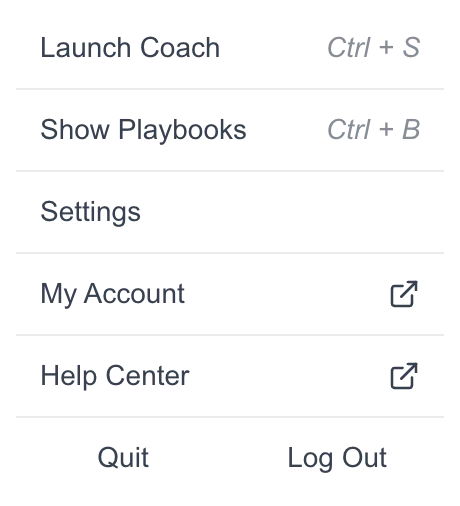
Quit Sayso completely from the Sayso menu and open it again. That clears a waiting update or an expired sign-in. On a Mac, if the icon is missing, use Apple menu > Force Quit, choose Sayso, then reopen it from Applications.
Find your symptom
| What you see | Fix |
|---|---|
| Launch Coach isn't in the Sayso menu | You're signed out or the account has no active subscription. Sign in, or check your subscription. On a team, ask your owner or admin. |
| The shortcut does nothing | Same as above, or Sayso is reconnecting to the internet. Wait a moment and try again. On a Mac, use Ctrl + S, not ⌘ + S. |
| The Permissions screen opens instead of the Coach widget | Sayso is missing microphone access. See Mac permissions or Windows microphone access. |
| Launch Coach is grayed out | Sayso is reconnecting, or an update is installing. Wait for it to finish. |
| Nothing happens when you click Launch Coach | An update may be waiting. Quit fully and reopen. Big updates can take a few minutes. |
| The Coach widget opened on another screen | It opens on the screen your mouse is on. Move your mouse to the screen you want and open it again. |
| "Sayso needs to be in your Applications folder" (Mac) | Click Move to Applications. See Install Sayso on a Mac. |
| The app won't open at all on an older Mac | Sayso needs macOS 13 (Ventura) or newer. Check Apple menu > About This Mac. |
| Permissions are on, but Sayso says they're missing (Mac) | See Permissions look on but Sayso says they are missing. |
| Signing in keeps sending you back to the sign-in screen | Your app may be out of date. Download the latest version and install it over the old one. See Download Sayso. |
| Can't find Sayso after installing (Windows) | Click the ^ next to the clock. See Keep Sayso visible on the Windows taskbar. |
| Windows install fails or stalls | See Antivirus or SmartScreen blocked Sayso. |
Check your Mac version
On a Mac, the wrong version for your chip (Intel on Apple Silicon, or the other way around) can fail without an error. See Which Mac do I have?
Still not working
Email support@asksayso.com with:
- Mac or Windows, and the version.
- On a Mac, whether you downloaded Apple Silicon or Intel.
- What happens when you click Launch Coach (an error, nothing, a flicker).
- Your logs.
Was this article helpful?
Still stuck? Email support@asksayso.com or join office hours (every Wednesday at 11am PT / 2pm ET).