Cue: live prompts during your calls
Updated November 23, 2026
While you talk, Cue suggests the next question, reframe or objection response in the Coach widget. You stay in control of the call.
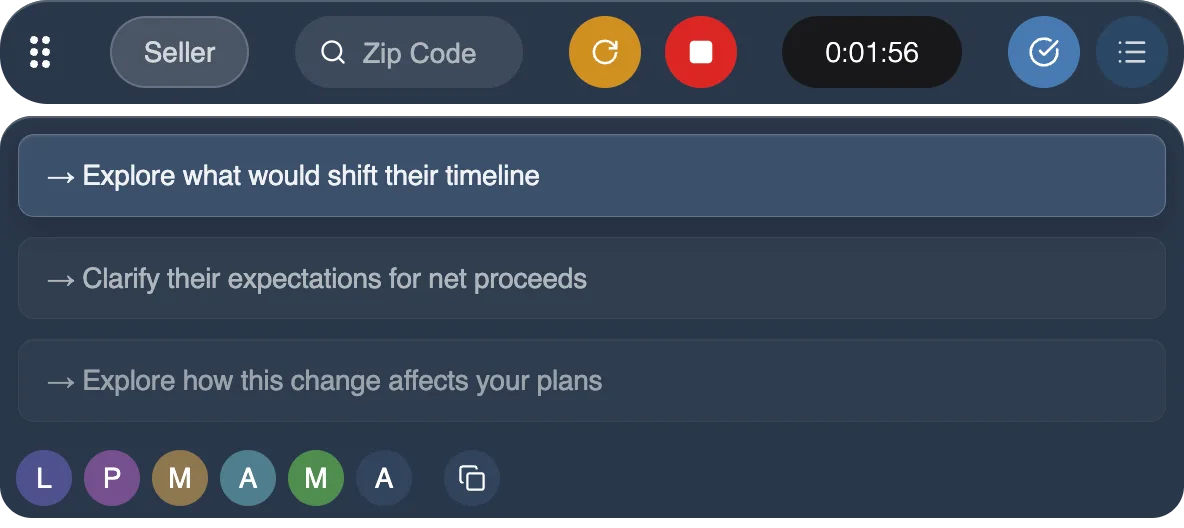
How prompts appear
- The first insight opens the insights panel under the Coach widget.
- The newest insight is at the top of the list and stands out from the rest. Up to five recent insights stay in the list; older ones drop off as new ones arrive.
- Click the X on an insight to remove it. The others move up.
- Click the pin on an insight to keep it at the top. See Pin an insight.
- To hide the panel, click the insights button (the check circle) in the Coach widget. While it's hidden, a red dot on that button tells you a new insight arrived. Click it again to show them.
How Cue follows the call
Cue coaches each conversation through three stages:
- Connect: building rapport and earning the right to ask questions.
- Discover: motivation, timing, money and their agent situation.
- Convert: booking the appointment.
Cue moves forward as the conversation covers each stage, starting from the moment the lead starts talking. Press Reset when a new person picks up, so the new conversation starts at Connect instead of halfway through your last call. More in Connect, Discover, Convert.
Make prompts fit how you work
- Prompt Style: short directions (Condensed) or full sentences with context (Full Insights).
- Buffer Time: how long Cue waits after you start or reset before it begins.
- Lead type: pick Seller or Buyer when you start, so Cue coaches for the right conversation.
What Cue needs
- Headphones, so Sayso hears you and the lead separately and cleanly.
- The call playing through your computer, not a cell phone.
See Set up your audio. If prompts aren't showing, see Why am I not seeing prompts?
Rate insights after the call
Rate insights with a thumbs up or down in Conversations in the web app. Ratings tell Sayso which prompts help. See Rate Cue's insights.
Lead with your own words or your script, and use Cue's prompts in the pauses.
Was this article helpful?
Still stuck? Email support@asksayso.com or join office hours (every Wednesday at 11am PT / 2pm ET).