Sayso's menu explained
Updated November 23, 2026
Sayso runs in the background. You control it from the Sayso menu: click the Sayso icon (the lightning bolt) in your Mac menu bar or in the Windows taskbar notification area.
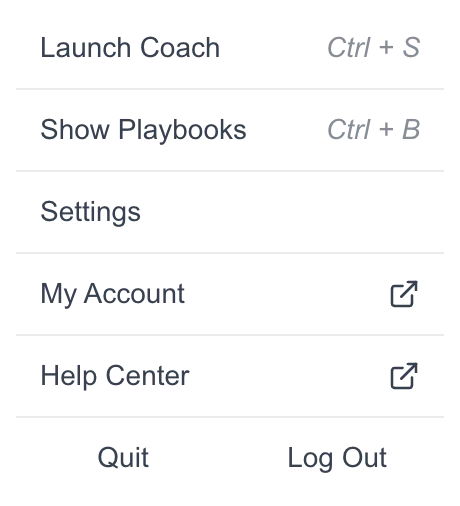
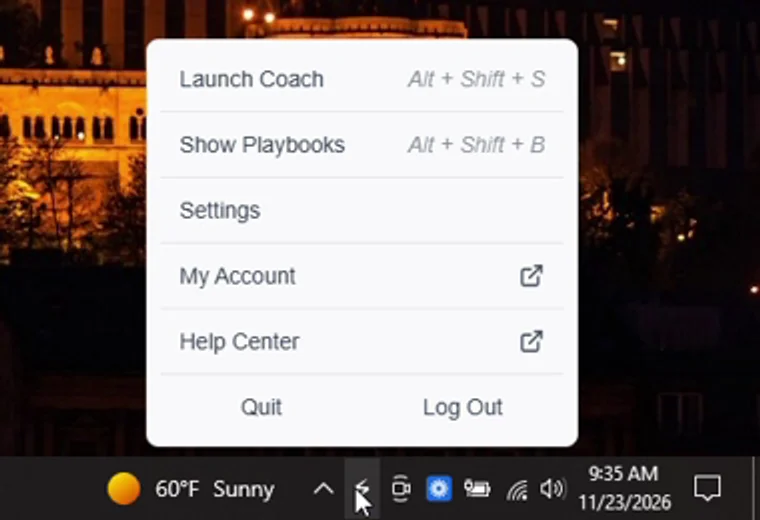
Can't find the icon? See Find Sayso in the Mac menu bar or Keep Sayso visible on the Windows taskbar.
Menu items
| Item | What it does |
|---|---|
| Launch Coach | Opens the Coach widget, the small bar you use during calls. Changes to Close Coach while the Coach widget is open. Shortcut: Ctrl + S on Mac, Alt + Shift + S on Windows. |
| Show Playbooks | Opens your scripts in their own window. Changes to Hide Playbooks while it's open. Shortcut: Ctrl + B on Mac, Alt + Shift + B on Windows. |
| Settings | Opens desktop settings: General, Cue, Pulse, Playbooks, Accessibility and Software Update. See Desktop settings. |
| My Account | Opens the web app in your browser, already signed in, on your Dashboard. Shows Opening… for a moment. |
| Update Available | Appears only when a new version is ready. Opens Settings on the Software Update tab. See Update the desktop app. |
| Help Center | Opens the Sayso Help Center in your browser. |
| Quit | Closes Sayso completely. See Quit and reopen Sayso. |
| Log Out | Signs you out of the desktop app. Shows Log In when you're signed out. See Log out or switch accounts. |
Why an item is missing or grayed out
- Launch Coach and Show Playbooks are missing: you're signed out, or the account has no active subscription. Sign in, or check your subscription. On a team, ask your owner or admin.
- Items are grayed out: Sayso lost its internet connection and is reconnecting, or an update is installing (Update in progress…). They come back once Sayso reconnects or the update finishes. My Account still works while reconnecting.
- Settings is missing: you're signed out.
- Move to Applications Folder appears (Mac): Sayso isn't in your Applications folder and can't update. See Install Sayso on a Mac.
Opening Sayso again from your Applications folder, Dock, Start menu or a taskbar pin while it's already running opens this same menu.
Was this article helpful?
Still stuck? Email support@asksayso.com or join office hours (every Wednesday at 11am PT / 2pm ET).