Why am I not seeing prompts?
Updated November 23, 2026
First step, always
Quit Sayso completely from the Sayso menu and open it again. A waiting update or an expired sign-in is often the cause.
Find your symptom
| What you see | Likely cause | Fix |
|---|---|---|
| Smart Capture fills in, but no prompts | Sayso isn't hearing you | Check that your headset is your computer's selected microphone and Sayso has microphone access. See My microphone isn't working. |
| Nothing at all, no notes and no prompts | Sayso can't hear the call | Place the call from your computer, not your cell phone. Set your dialer to call through the computer or internet, not "always use mobile phone". On a Mac, check the screen and system audio permission. See Sayso hears me but not the lead. |
| Prompts are off-topic, or say "book the appointment" right after hello | No Reset since the last conversation | Press Reset every time a new person picks up. |
| Prompts are messy or repeat | You're on speakers | Wear headphones, so the microphone doesn't pick up the lead's voice too. |
| Prompts take a long time to start | Buffer Time, or the normal warm-up | Give it the first exchange of the call. If you Reset at pickup, set Buffer Time to 0. |
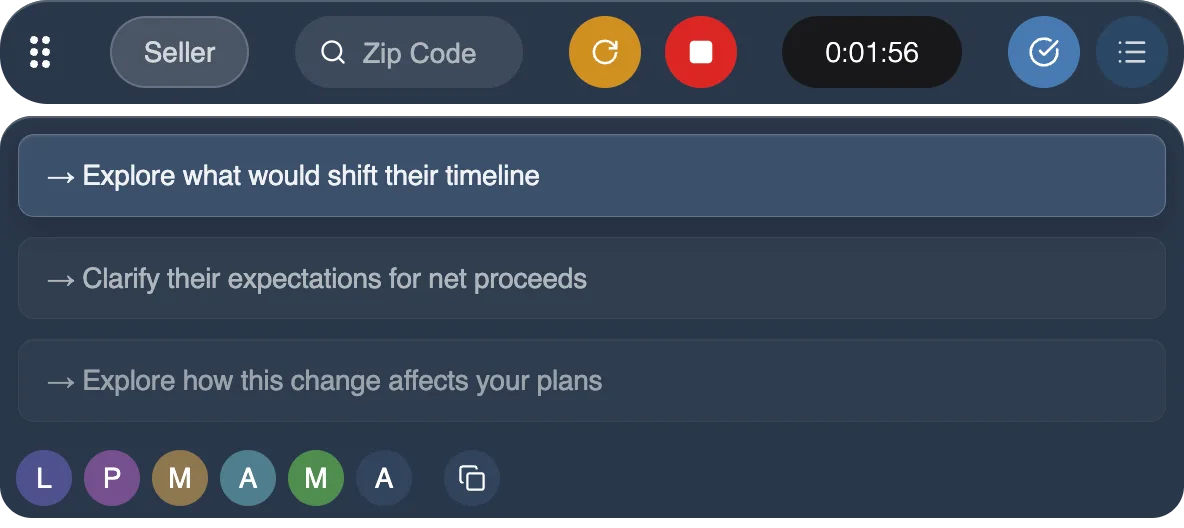
| The insights panel is closed | The panel was hidden | Click the insights button (check circle) in the Coach widget. A red dot means new insights are waiting. |
| A message under the Coach widget | Sayso stopped the session or couldn't start it | See Messages you might see in the Coach widget. |
Other things to check
- Lead type: you started with Start for Seller or Start for Buyer to match the person you're calling.
- Browser: open your CRM and dialer in Google Chrome. Safari has grabbed the microphone in the past.
- Voicemails: voicemail greetings can trigger prompts. Reset before your next live conversation.
- Mac version: Sayso needs macOS 13 or newer.
- The timer is running: if the Coach widget shows the Start buttons, no session is running. Start one.
Still not seeing prompts
Email support@asksayso.com with:
- The dialer and CRM you use.
- Whether Smart Capture notes are filling in.
- How far into the call you were.
- Your logs. See Send your logs.
Was this article helpful?
Still stuck? Email support@asksayso.com or join office hours (every Wednesday at 11am PT / 2pm ET).