Keep your script open next to Cue
Updated November 23, 2026
Open your playbooks
- Press Control + B on Mac or Alt + Shift + B on Windows.
- Or click the Sayso icon in your menu bar or taskbar and choose Show Playbooks.
- During a session, click the list icon on the right of the Coach widget.
Playbooks opens without a session, so you can read one before you dial.
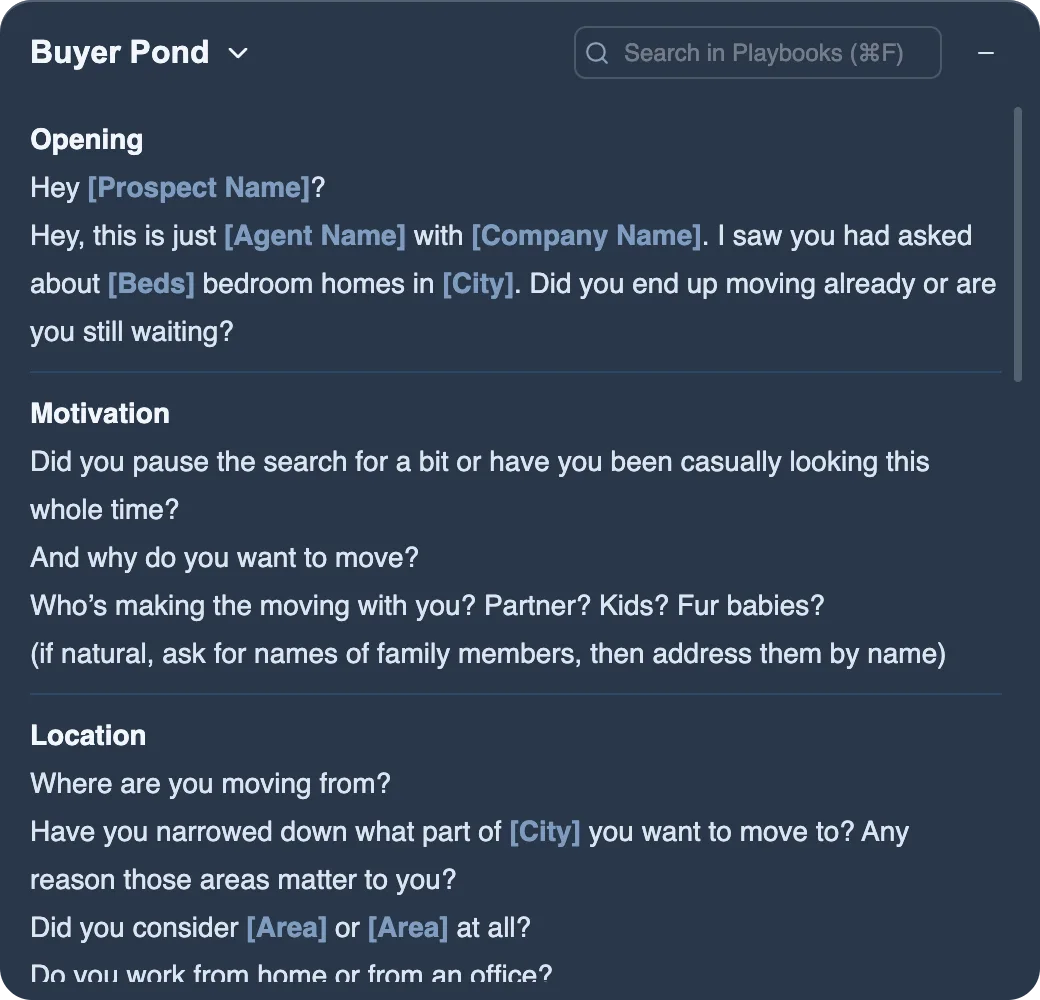
Use it during a call
- Pick the playbook for the calls you're making from the list.
- Search inside a playbook with Search in playbooks (⌘ + F on Mac, Ctrl + F on Windows). Use the arrows to jump between matches.
- Lead with your script. Glance at Cue when the conversation goes somewhere the script doesn't cover.
Bring your own scripts
Sayso comes with six ready-made playbooks (Circle Prospecting, Buyer Pond, FSBO, Appt Setting, Open House Visitor and Expired), and you can upload your own scripts as PDF, Word (DOCX) or text files. You can also choose which playbook opens first. See Upload, rename and remove your own playbooks.
Related
Was this article helpful?
Still stuck? Email support@asksayso.com or join office hours (every Wednesday at 11am PT / 2pm ET).