Fill in your LPMAMA without taking notes
Updated November 23, 2026
What Smart Capture listens for
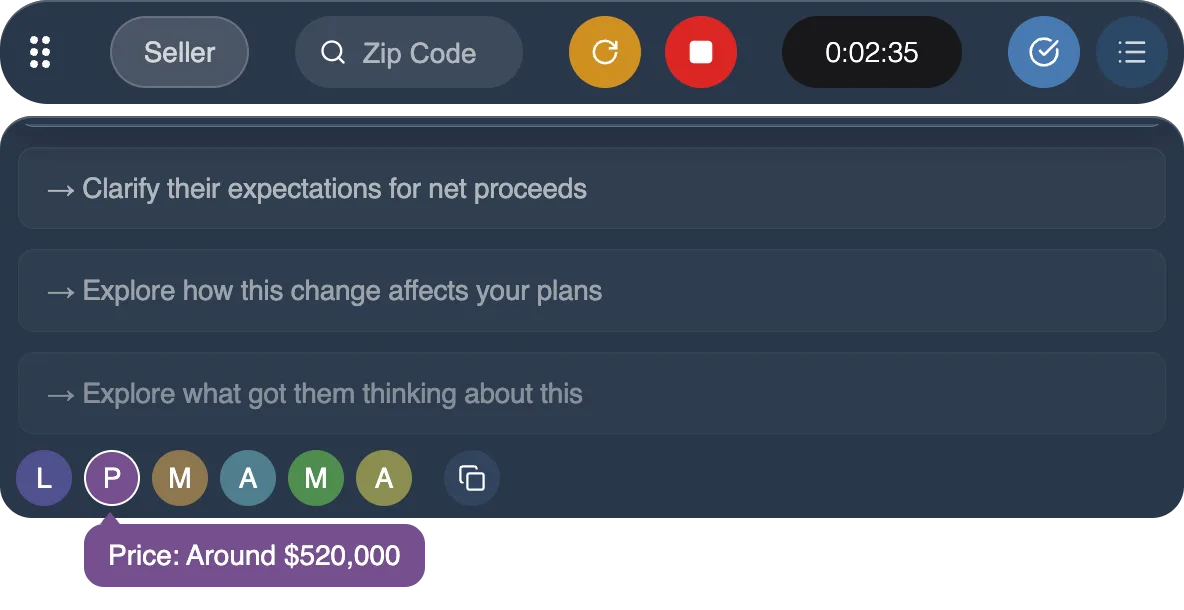
LPMAMA is the qualifying framework many agents already use. Smart Capture fills in these fields:
| Letter | Field | What it captures |
|---|---|---|
| L | Location | Where they want to buy or the property they want to sell |
| P | Price | Their price range or price expectations |
| M | Motivation | Why they want to move |
| A | Agent | Whether they're working with another agent |
| M | Mortgage | Their financing situation |
| A | Appointment | Whether you set a time to meet |
Use it during the call
The Smart Capture row sits at the bottom of the insights panel in the Coach widget: one circle for each letter. A circle fills in when Sayso hears something for that field. Hover a circle to read what it captured. If nothing has come up yet, it says No data yet.
Use the empty circles as a checklist. If Motivation is still empty halfway through the call, that's your next question.
Copy your notes
Click the copy icon at the end of the row to copy all six fields at once, then paste them into your CRM. Do this before you press Reset, because Reset clears the row for the next conversation.
If you use Follow Up Boss or Sure Send, send the notes to the lead from Conversations after the call instead. See Send your notes to your CRM.
After the call
Smart Capture notes are saved with each conversation. If a field is wrong or missing, you can edit it in the web app. See Edit Smart Capture notes after a call.
Related
Was this article helpful?
Still stuck? Email support@asksayso.com or join office hours (every Wednesday at 11am PT / 2pm ET).