Using Sayso during a dial block or power dialer session
Updated November 23, 2026
Set up once per dial block
- Headphones on, dialer set to call through your computer.
- Group your leads by type. Make all your seller calls in one session and all your buyer calls in another.
- Open the Coach widget and click Start for Seller or Start for Buyer.
- Set Buffer Time to 0. See Buffer Time.
One session covers your whole dial block. Don't stop and start between calls.
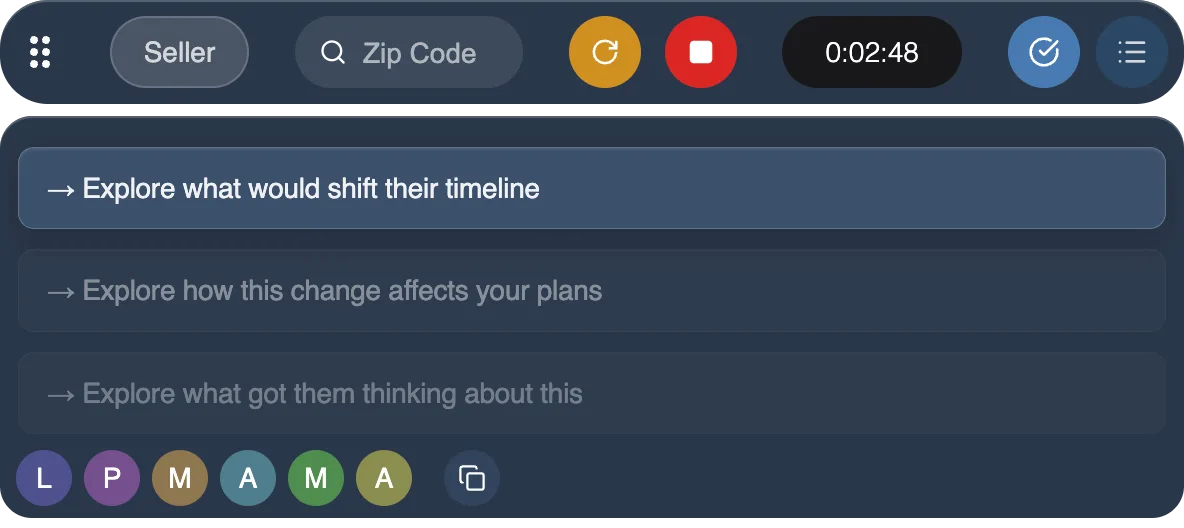
At every pickup
Press Reset when a person answers. Reset keeps each conversation separate:
- Cue starts at Connect for the new person instead of where the last call left off.
- Smart Capture starts empty, so notes don't mix between people.
- Each conversation is saved as its own entry in Conversations.
On a multi-line dialer, press Reset when a live person connects, not when the lines start ringing. If a minute or more goes by with nobody answering, press Reset anyway before the next live conversation.
Voicemails, screeners and hold music
Voicemail greetings and call screeners can trigger prompts. Ignore them and press Reset when a person picks up. If your dialer plays a lot of ringing or screening before people answer and you don't press Reset right at pickup, raise Buffer Time instead so Sayso waits before showing insights.
Grab notes between calls
To paste notes into your CRM between calls, click the copy icon at the end of the Smart Capture row before you press Reset. Or keep dialing: every conversation is saved, and you can send notes to Follow Up Boss or Sure Send from Conversations after the block. See What to do after each call.
Between calls, only do what can't wait, like sending a calendar invite. Do other admin work after you press Stop, because the session counts time until you stop it.
End the block
Press Stop when you're done. If you forget, Auto Stop ends the session after a few minutes without hearing anyone on the other end. See Auto Stop.
Related
Was this article helpful?
Still stuck? Email support@asksayso.com or join office hours (every Wednesday at 11am PT / 2pm ET).